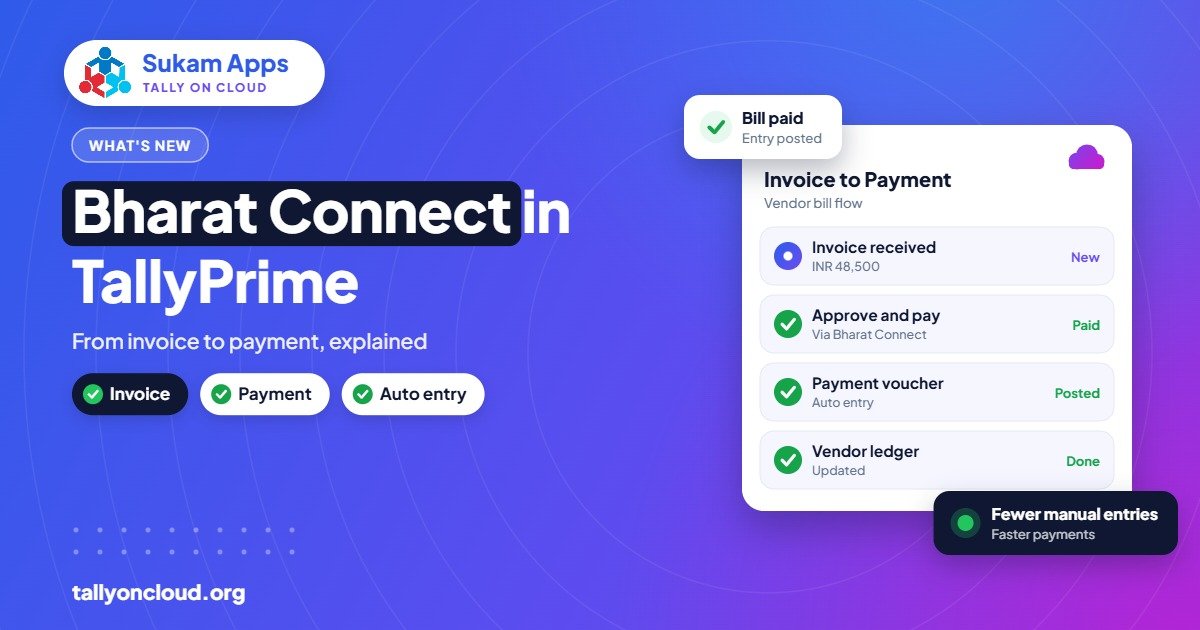
Bharat Connect for Business is a plug-in that arrived with TallyPrime 7.0 (released 19 December 2025). In simple terms, the Bharat Connect Tally integration joins the invoice and the payment into one flow: a supplier’s invoice reaches the buyer, the buyer pays against it, and the matching purchase entry can be created in the buyer’s books automatically. For businesses that chase payments or re-type supplier bills every day, that removes a lot of manual work.
This guide explains what the plug-in is, how the invoice-to-payment flow works in practice, which businesses gain the most, and what to check before switching it on. We run TallyPrime for clients on cloud servers every day, so we have also covered how it behaves on a Tally on Cloud setup.
What is Bharat Connect, and why is it inside Tally?
Bharat Connect is the name of the NPCI-backed payments network that most people knew earlier as Bharat BillPay, the system behind paying electricity and phone bills through bank apps. The business version extends the same idea to B2B payments: one business raising a bill, another business paying it through its bank.
Tally’s role is to sit at both ends. Most Indian SMEs already raise their sales invoices in TallyPrime, and most of their buyers record purchases in TallyPrime too. When both sides are on the same software and the payment network sits in between, the invoice does not need to be emailed as a PDF, printed, re-typed and then paid separately. It can travel as data.
How the invoice-to-payment flow works
The exact screens depend on your TallyPrime release and the plug-in version, so check TallyPrime help for the exact option names. Conceptually, the flow looks like this:
- Supplier raises a sales invoice in TallyPrime as usual.
- The invoice is shared over Bharat Connect to the buyer, instead of only being emailed or sent on WhatsApp as a PDF.
- The buyer sees the bill and can review it before deciding to pay.
- The buyer pays through their bank on the network, against that specific invoice.
- Both sides get a clear status, so the supplier knows which invoice was paid rather than receiving an unexplained lump sum.
- The purchase entry is created automatically in the buyer’s TallyPrime, so the accounts team does not re-type the supplier’s bill.
The two big wins are in steps 5 and 6. Payment matching and purchase data entry are the most boring and error-prone jobs in a small accounts department, and they are exactly what this plug-in tries to automate.
A worked example from Punjab
Take a Ludhiana yarn dealer supplying twenty hosiery units. Today, the dealer’s accountant prints invoices, sends photos on WhatsApp, and then spends the first week of every month calling units to ask which bills their NEFT transfers were meant for. On the buyer side, each hosiery unit’s accountant types the yarn bill into TallyPrime by hand, sometimes with the wrong rate or a missed GST line.
With Bharat Connect for Business on both sides, the dealer’s invoice goes across as structured data. The hosiery unit approves and pays against that invoice. The dealer sees which bill is settled, and the hosiery unit’s purchase voucher is already in its books. The phone calls and re-typing mostly disappear. Nobody has to remember that “₹1,84,300 on the 9th” was for three bills from last month.
The benefit grows with volume. A single supplier with two customers will barely notice. A distributor with a hundred retailers, or a manufacturer buying from forty vendors, will feel it in the first month.
Who benefits most from Bharat Connect in TallyPrime
| Business type | Main benefit | Why |
|---|---|---|
| Distributors and wholesalers | Faster collections, cleaner receipts matching | Many small invoices and many payers each month |
| Manufacturers with many vendors | Auto purchase entries | Less re-typing of raw material and job-work bills |
| Pharma supply chains (for example around Baddi) | Traceable invoice-level payments | High invoice counts and tight credit terms |
| CA firms handling client books | Fewer reconciliation queries | Payments arrive already linked to invoices |
| Small retailers buying from one or two suppliers | Modest | Volume is too low for big savings, but convenience still helps |
One honest caveat: the flow works best when both parties use it. If your key buyers are not on TallyPrime 7.x or have not enabled the plug-in, you will run a mixed process for a while: some invoices over Bharat Connect, others the old way. That is normal during any rollout.
What you need before you start
- TallyPrime 7.0 or later. The plug-in came with 7.0. If you are on an older release, you need to update first, and updating needs an active TSS subscription. Our TSS renewal guide explains how that works.
- A participating bank relationship. Payments run through banks on the network. Ask your bank whether it supports Bharat Connect for business payments.
- Clean party masters. GSTINs, addresses and ledger names should be correct. Automation on top of messy masters creates messy entries faster.
- Clear approval rules. Decide who in your business can approve and pay an incoming invoice. Do not give payment rights to every user.
- A backup first. Before any version upgrade, take a full backup. TallyPrime 7.0 also brought TallyDrive and automatic background backups, covered in our TallyDrive guide.
Setting it up: the general sequence
We are not going to list menu paths here, because they can change between releases and the plug-in is still new. Check TallyPrime help for the exact option. The general sequence our team follows for clients is:
- Update to TallyPrime 7.0 or later on every machine or on the cloud server.
- Take a full backup and confirm it restores.
- Enable the Bharat Connect for Business plug-in for the company.
- Complete the registration or linking steps it asks for, including bank details.
- Review party masters for your top suppliers and customers.
- Run a test with one friendly supplier or customer before using it widely.
- Set user rights so only authorised people can approve payments.
How it fits with PrimeBanking and SmartFind
TallyPrime 7.0 brought three money-related features together, and they overlap a little:
- PrimeBanking lets you pay vendors from inside TallyPrime, track UTR status and auto-reconcile with bank statements. It is about your bank account. Read more in our PrimeBanking guide.
- Bharat Connect for Business is about the invoice travelling between two businesses and being paid against, with purchase entries created at the buyer’s end.
- SmartFind helps you search masters and transactions from any screen, which is useful when you are checking whether a specific bill has been paid.
Used together, the picture is: invoices arrive as data, get paid against, land in the books automatically, and reconcile with the bank with less manual work.
Does it work on Tally on Cloud?
Yes. On a hosted Tally on Cloud setup, your licensed TallyPrime runs on a remote Windows server and your team connects through RDP, RemoteApp or a browser. Plug-ins that run inside TallyPrime work the same way there as on an office PC, because it is the same software.
Two things are easier on cloud:
- One update, everyone covered. The provider updates TallyPrime once on the server, and every user is on 7.x together. There is no chasing five office PCs and one laptop at home.
- Approvals from anywhere. The owner can log in from a phone or a laptop while travelling and approve a payment, without the accountant sending screenshots.
One thing to plan for: payment approvals often involve an OTP or bank-side confirmation. Make sure the person approving has their registered phone with them, wherever they are logging in from.
Cautions before you rely on it
- Review auto-created entries for the first few weeks. Check that ledgers, GST rates and item mapping on the auto purchase entries are what your CA expects.
- Keep your audit trail on. Companies under the Companies (Accounts) Amendment Rules need the edit log from 1 April 2023. Auto-created entries should sit inside that same audit trail.
- Do not drop your old process overnight. Run both in parallel until your main parties are comfortable.
- Train the team. Accountants need to know what an incoming Bharat Connect invoice looks like and what to do with a disputed one.
Frequently Asked Questions
Is Bharat Connect for Business free in TallyPrime?
The plug-in comes with TallyPrime 7.0, but your bank may have its own terms for payments over the network. Check with your bank and your Tally partner for current charges before rolling it out.
Do both the supplier and buyer need TallyPrime?
The full invoice-to-payment flow with automatic purchase entry works best when both sides use TallyPrime 7.x with the plug-in. If one side does not, you can still use parts of the process, but the automation benefit is smaller.
Which TallyPrime version do I need for Bharat Connect?
TallyPrime 7.0 or later. 7.0 was released on 19 December 2025. Updating from an older release needs an active TSS subscription.
Will auto-created purchase entries be correct for GST?
They are built from the supplier’s invoice data, so accuracy depends on clean masters on both sides. Review them for the first few weeks and have your CA check the GST treatment on a sample.
Can I use Bharat Connect on Tally on Cloud?
Yes. Tally on Cloud runs the same licensed TallyPrime on a remote server, so the plug-in works the same way. Updates are simpler because the server is updated once for all users.
How is this different from PrimeBanking?
PrimeBanking handles payments and reconciliation from your own bank account inside TallyPrime. Bharat Connect for Business connects the invoice between two businesses so payment and purchase entry follow from it.
Want to try Bharat Connect without disturbing your current books? Sukam Apps has been setting up Tally for businesses since 2011. We can update you to TallyPrime 7.x on a cloud server, test the plug-in with one party, and train your staff in Hindi or Punjabi, on-site across Punjab, Haryana, Himachal, Chandigarh Tricity and Delhi NCR, or remotely anywhere in India with a dedicated account manager. WhatsApp +91 99142 49191 for a free demo, or contact us here.